Savings goal app for kids: see how close the goal is
A savings goal app for kids: goals fill up as your child earns, show about how many weeks are left, and you can add a match. No real money moves.
A savings goal app for kids should answer the question every child asks on day two: "How long until I can buy it?" In Kroni, a goal fills up from your child's balance as they earn, and once there's a little history it shows roughly how many weeks are left at their usual pace. You can add a match on money they put aside. Kroni never touches real money. You keep the cash, Kroni keeps the books.
Why savings goals stall
Saving is one of the best money lessons a child can get, and one of the easiest to give up on. When a goal stalls, it's rarely because the child stopped caring. It's usually one of three things:
- The goal is invisible. Coins in a jar or a number in a banking app don't show how far there is to go.
- The wait feels endless. To an eight-year-old, "a few months" means nothing. "Three more weeks" does.
- The money leaks. Small treats eat into the savings without anyone noticing, until the goal is further away than when they started.
Savings goals kids actually reach goes deeper into choosing the right goal. Below is how the app part works.
How a goal works in Kroni
Your child, or you, creates a goal: what they're saving for, a symbol and how much it costs. They pick how it fills up on screen, as a glass, a ring, a tree, a rocket or a jar. A goal can be for saving up or for giving to others.
The goal fills up from your child's balance as they earn. Every approved chore and every allowance moves it forward. There's no separate savings step your child has to remember before the goal starts to move.
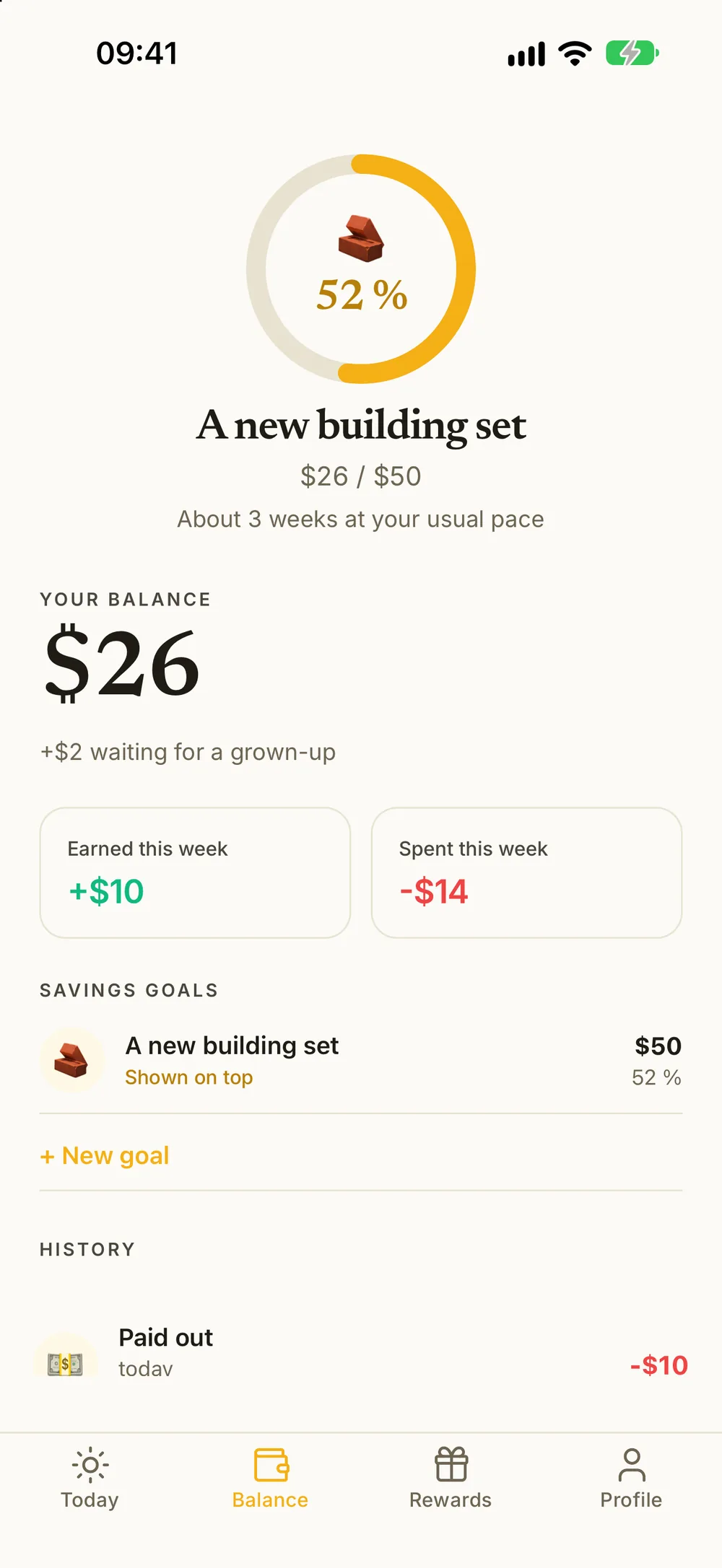
"About 3 weeks at your usual pace"
Once your child has about two weeks of history, the goal on top of their balance shows a line like About 3 weeks at your usual pace. It's based on what they have earned per week over the last four weeks. You see the same estimate for each goal on the parent side.
The line stays hidden when there's nothing sensible to say: when your child hasn't earned anything lately, when the goal is more than a year away, and once the goal is reached.
That one line changes the conversation. Instead of "can I have it now?" you hear "what if I do an extra chore?". If the goal has a deadline, like a birthday or a school trip, you can check together whether the plan adds up. Saving by a deadline shows how.
Several goals, one on top
Kids rarely want just one thing. Your child can have several goals at once and pick the one to show on top of their balance. If they don't pick, the oldest open goal is shown.
Every goal reads from the same balance, so two goals can both look half full. If your child wants to keep money aside for one of them, they can put money in to that goal, and take it out again if they change their mind. Money put into a goal is set aside from the balance, so it doesn't get spent on a reward by accident. Two savings goals, one balance has ideas for splitting it.
Match what your child saves
Many parents want to reward saving itself, not just earning. On a goal, set a percentage under Match savings. When your child puts money into that goal, they see that a grown-up adds that percentage, and your match counts toward the goal.
An example: you set a 20 percent match on a bike goal. Your child puts $10 into it, and your $2 counts toward the bike as well. It's a small push that makes setting money aside feel worth it. Agree on a cap up front, so a big birthday gift doesn't turn into a big bill for you. See matching your child's savings.
Where the money comes from
A goal only moves when the balance does. In Kroni the balance grows from:
- Chores with a reward. They land on the balance when you approve them, or right away for chores that don't need approval.
- Allowance, if you want one, every week, every other week or every month.
- A little extra from you, with a note, for a birthday or a good report card.
If you use a family tax, part of what your child earns goes to a family pot, and the weeks-left line counts what they earn after tax. Spending on rewards lowers the balance, which moves the goal back too. That's a lesson in itself. Balance explained for kids puts it in words a child understands.
Kroni keeps the books, you hold the money
Kroni never moves real money and never connects to a bank or a card. The balance is a shared record between you and your child. When the goal is reached, your child gets a celebration on their screen. When they actually buy the thing, you pay in cash or by card, open the goal and choose Reset / Purchase. Money put into the goal and your match are used first, then the balance.
If you pay out part of the balance in cash along the way, take that amount out of the balance. It shows as Paid out in your child's history, so it's clear what has been handed over and what is still owed. When allowance cash goes missing shows why that line matters.
Goal sizes that work by age
These are starting points, not rules:
- Ages 6 to 8: one to three weeks. A small toy, a comic book, a trip for ice cream.
- Ages 9 to 11: four to eight weeks. A game, a soccer ball, the sneakers they want more than you do.
- Ages 12 to 14: two to six months, often with a match. A bike, headphones, a day out with friends.
If the line shows a longer wait than your child can manage, split the goal. A first stop halfway is easier to keep going for. Savings milestones for kids has more on that.
Getting started
- Pick one goal together that would take three to eight weeks at your child's current pace.
- Let your child create it and choose how it fills up. Ownership matters more than the exact amount.
- Decide on a match, or decide against one. Both are fine. Just be clear about it.
- Look at the line together after two weeks, when the estimate appears. If the goal feels too far away, add a bonus job or pick a nearer goal first.
What it costs
Kroni is free to download for iPhone, iPad and Android, and the free version has no time limit. Savings goals, matching and the weeks-left line are all included in it, for one child and five active chores. Kroni Family unlocks unlimited kids and chores at one price for the whole family, and new subscribers get a 7-day free trial.
Frequently asked questions
- Does the app hold real money?
- No. Kroni keeps the books and never moves real money. Your child's balance is a record of what they have earned. When they buy what they saved for, you pay in cash or by card and record the purchase in the app.
- How does Kroni know how many weeks are left?
- It looks at what your child has earned per week over the last four weeks. Once there are about two weeks of history, the goal shows a line like About 3 weeks at your usual pace. The line is hidden when nothing has been earned lately, when the goal is more than a year away, and once the goal is reached.
- Can my child have more than one savings goal?
- Yes. Your child can have several goals and pick one to show on top of their balance. If they haven't picked one, the oldest open goal is shown.
- How does matching work?
- On a goal, you set a percentage under Match savings. When your child puts money into that goal, they see that a grown-up adds that percentage, and it counts toward the goal. Agree on a cap before you start.
- What happens when the goal is reached?
- Your child gets a celebration on their screen. When they actually buy the thing, open the goal and choose Reset / Purchase. Money put into the goal and your match are used first, then the balance.